June 29, 2010

Vows in Vegas, Baby! -- { Las Vegas Wedding...kind of }

Las Vegas Wedding Photography Bride Couture Dress

Las Vegas Wedding Photography Couture Dress bride

Las Vegas Wedding Photography lights kiss


Andrea Hanks has become one of my best friends.I will refrain from calling her my bestie--because it's lame--but I am grateful for her friendship. She and her studmuffin husband John eloped to Vegas 14 years ago and deep down she's always wanted some wedding photos...especially now that she is a wedding photographer herself. So we hatched a plan. John was a really good sport as we dragged him around and I think it's possible that he even had a good time...but don't quote me on that. We had a blast and the images are killer. Take a look for yourself.

For those of you on smart phones who can't see the slideshow below, click here to be whisked electronically to the facebook album.

June 28, 2010

Chase Jarvis Gives Advice on Success

Chase Jarvis is as successful as they come as a photographer.
That is what makes this post either maddeningly hypocritical or dead-on target.
You can decide for yourself.

June 25, 2010

World Cup Fever!

I LOVE the World Cup! 
I'm so excited for the USA and Slovakia (I lived there for a year and speak Slovak) to have both gone through and all I have to say is USA! USA! USA!

Well we had the amazing opportunity to go to the 2006 World Cup in Germany. We saw the USA vs. Czech Republic game in Gelsenkirchen, Germany. I wanted to push my own juju in a South African direction by posting some photos from that amazing experience.


No seats on the train but that didn't stop this guy from getting to the game in place of someone's luggage.

MAIN PHOTO


MAIN PHOTO


I cried when the Star Spangled Banner was played. {Pride.}

MAIN PHOTO


MAIN PHOTO


MAIN PHOTO

Who says Americans don't like soccer!?!

MAIN PHOTO

See more at www.jonwoodbury.com

June 16, 2010

How Adults Kill a Good Image

Whenever I am photographing families with children the first instruction I give is the adults look at me. I will watch the children and shoot when they are looking forward but I can't watch the adults and kids all at once. I just trust that the grown-ups exercise self-control and keep their faces forward. Here is why.
After about 15 frames of struggling to get this adorable little princess to look at the camera, she FINALLY looked forward, and...crap...mom is looking at her. I remind mom to look at me then the other adults take turns watching to make sure she's looking. Yeah, yeah, I can photoshop it, but it's so much easier for everyone to just look forward. Now you know.


June 15, 2010

*T-Shirt Wars - More Stop-Motion Animation

More really cool things photographers are doing!


McDonald's and Coke loved that video so much they asked the filmmakers to shoot a commercial for them. Here it is: (Am I delivering today or what?)

June 11, 2010

Photo IQ - Week 6 - "Jpeg" is a 4-Letter Word..."Compression" is Not.

This is the final of the six Photo IQ posts! Thanks to everyone who has read these so far and I hope the posts have established a good foundation. I will continue to write tips and instruction going forward but I intend to break things down into smaller pieces and build upon what we've laid out so far.
In case you missed them, here are the 5 previous posts in the series:


Click here to send me your thoughts and/or questions.

Just about everyone has heard the term "jpeg". (For those of you who have recently awoken from a decades-long slumber, it's the thing that comes out of your camera now instead of film.)
What does it mean and how does it affect your photography?
JPEG is an acronym for Joint Photographic Experts Group but that's not important right now...and don't call me Shirley. (Thanks, Paco, for putting the Airplane! references into my head. Now they're stuck there.)

When a digital camera "takes a picture" light comes in through the lens and hits the sensor. The sensor converts the light into data. Then the processor in the camera takes all that raw data and interprets it according to predefined rules to create the actual usable image. The pre-assigned parameters tell it what data translate to what colors, noise reduction, how much contrast, etc.
Some cameras--mostly DSLRs--give you access to that RAW data and the ability to process it yourself later on. This gives you the flexibility to shoot first and ask questions later. This flexibility is why many professionals choose to shoot raw. The trade-off is the fact that there is no actual image file until you give the program (Lightroom, Aperture, Bibble, or the included software from the camera manufacturer)the parameters so it can create an image file, making the whole process more time-consuming.
Raw files have had nothing done to them so they look boring. They appear dull and unappealing. You must process them as the camera would in order to create a jpeg image.

Raw file, totally untouched is on the left, processed file on the right. (From a shoot I did for Modest Couture By Elizabeth in Las Vegas.)


The difference in the above images is that in the second I defined a white balance as warmer than what was shot, added some sharpening, and some contrast, and voila, a better image.

So how to decide when to set that "Quality" setting on your camera to Basic vs. Super Fine?

The two factors of your decision are file size vs. quality. Remember that this is NOT the physical dimensions of the image itself, it is the amount of memory the image takes up on your memory card or hard drive and the image quality.

Below is the exact same image, one saved at a low compression (240 kb) and the second at a higher compression (80 kb).
You can see the glitches and inconsistencies in the second image although it is not as distinct as it has been in the past. (These were both saved in Photoshop CS4. Some programs compress better than others.) The transitions from color to color are more abrupt and blockier.


Compression accounts for the difference in the size of the file.


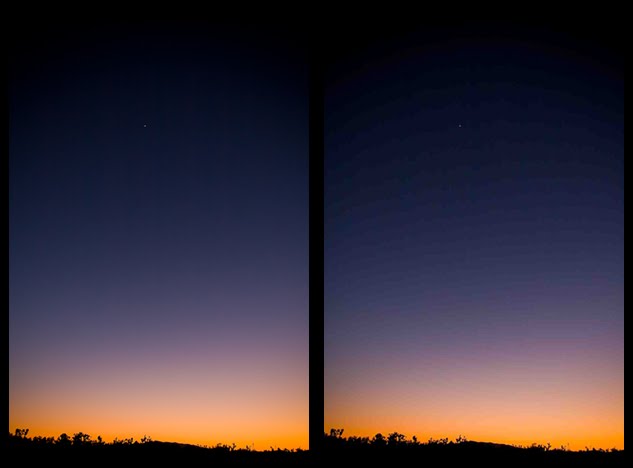
When you choose a lower quality image compression (again, not size--quality is usually listed as fine, medium, super fine, etc.) on your camera, the processor lumps together similar colors in order to save space. So where there would normally be a gradual transition across 100 slightly different colors of blue, all of which must have separate data information, the processor decides to convert it instead to 10 different colors of blue. The only data then necessary is one piece of color data then the number of consecutive pixels that are that color. You lose the information for 90 colors of blue. It saves space but instead of getting a nice gradient you get banded lines that have abrupt changes from one color to the next. If you ever see these lines (usually in a nice, blue sky) you know your compression is too high. Change the quality to super fine or live with the banding.

In the first image below, the transition is smooth from the oranges into the purples. In the second image (with higher compression) you'll see big blocks of color that instead of being many shades of purple have been lumped into a single color.
If the side by side comparison is too small to see the concept keep scrolling. I have included both files in a much larger size after the post.
(Note, this is a somewhat difficult concept to illustrate on the web because most blog platforms automatically reduce the compression on whatever you upload to save space. There will be some banding on the first image because of that. I tried to exaggerate the concept in the second image so you can see the difference.)


So there you go. Remember that once your camera creates a jpeg, it throws all the unused data away. Once you have tossed the transitional colors in this scene, they are gone. The image on the right is the best image you will get. My advice? Memory cards are cheap. Always set the highest quality possible and buy a few more.

Hopefully this little photographical tidbit has explained the mysteries of the universe.
This has been a fun series for me to write. I have tried to be thorough without being overly technical and/or long-winded.
I will keep it up as long as you all keep coming back, deal?


June 9, 2010

Some Heavy Light Violence After Lunch?

Painting with light...cool. Stop-motion animation...cool.
Combining the two? AWE-FREAKING-SOME!

Photography and videography continue to merge. Stop-motion animation has had a major resurgence with some pretty big commercials and projects. It's very time-consuming to make and just fun to watch.

The first video here is the how-to. Watch that then watch the final product. This is just cool.


The final product. So many people doing so many cool things with photography!

June 5, 2010

Shooting the Moon

January 29, 2010 was a crisp, clear night. It was also the time of year when the full moon is the very closest to the earth.
On the suggestion of a friend, Maddie, I went out and played around. It turned out much better than I expected.
I am working on a post with the how-to of this image so keep an eye out.

Full Moon Image Photo

June 3, 2010

Photo IQ - Week 5 -- Focus and Focusing

Focus, people! We are getting close to the end of the series!
We are on part 5 of my 6-part series on what makes up Image Quality. Photo IQ.
Why, you ask, did it take this long to tackle something so basic as focus? I'm blaming global climate change.
Why bother talking about focus at all? It seems fairly obvious that when your subject is out of focus it will not be a quality image. True. But there is more to focus than just pushing the shutter button halfway down--although that is baffling enough for many.

How focus works:
The auto-focus system in today's cameras works on a simple principle. It evaluates the scene and finds areas of high contrast. By comparing the line between the light and dark portions it makes a decision on the point where the object has the highest contrast. Point and shoot cameras use the sensor to determine the focus of the entire image while DSLRs evaluate on a much smaller scale at many different points in the frame, that is why they are more accurate. If you want more detail on how these work, this is a great article.

This method typically works well until the light gets low and the camera can no longer discern between two different areas of value. At that point, the camera begins to hunt for focus and may eventually just stop.
In the dark when there is no contrast, your camera should have an option to fire a focusing flash. It may fire automatically or you can trigger it yourself. It fires a rapid succession of small flashes that allow the camera to find the contrast it needs.


Types of auto-focus:
Single Frame: The camera focuses when you push the shutter halfway down. It's the best option for subjects that probably won't be moving since when you reframe the shot the focus will already be fairly close and your chances of consecutive shots being focused correctly are higher.

Servo: The camera tracks the subject through the frame. It is one of the main reasons to upgrade to a more expensive camera since a truly effective servo focus is expensive and technologically complex. If you are going to shoot sports or anything that continually moves, you are a prime candidate for expensive cameras.

Hybrid: The different camera companies call it different things but it is typically single frame focus mode but the camera reserves the right to refocus if it detects that the subject moves. I rarely use the hybrid focus (AI Focus on my Canon) because I don't want the camera making the decision on what the subject is. If it's moving, I'll use Servo, if it's not, I don't want it switching focus on its own.

Auto focus options
Typically there are a couple options for autofocusing: Fully auto, and manually choosing a point.
It's typically more effective to choose your own focus point since the camera doesn't actually know what you want to focus on. It will typically focus on the front and center. If you're shooting past something you will almost always miss focus when you let the camera decide.
In a point and shoot you have much deeper depth of field because of the small sensor but the same concept applies. Most have a focus area of the screen that you can move around if you want to focus on something off-center. These days most p&s cameras have face-detection too, which is awesome. It searches for anything it thinks is a face and focuses there. It's quite handy and typically works very well. (My G11 even finds photos of faces that are minuscule.)

As far as Image Quality goes, focus is crucial.
Take the time to stop, brace yourself and squeeze the release. There is a lot of resuscitation you can do on missfire images in Photoshop but focus is not one of them. Trying to focus a missed image in software is mostly an exercise in futility. If your original file is big enough you can probably make it passable for web use but you simply cannot focus an unfocused shot after the moment is gone.
If you miss something, don't let it get you down. We all miss focus sometimes, especially when shooting with faster, riskier apertures. (At 6 feet away, f 1.8 and 50mm, the total depth of field is under 4 inches vs. about a foot at f4.)
If you are consistently frustrated with your focus, there are a few things you can do.
First, check your shutter speeds. A little bit of motion blur looks an awful lot like missed focus. Typically, if the focus missed, something in the frame will be in focus. If you can't find anything, perhaps you or the subject moved. I have seen a HUGE rise in the percentage of usable images since I started paying a little more attention to my shutter speeds. Often times we switch to aperture priority mode and just leave it while the light fades. Before long we are shooting at 1/30 or 1/20 of a second and the images end up blurred.
Second, same concept, different issue. The general rule is that you can hand-hold (not use a tripod) at shutter speeds equal to your focal length (lens zoom.) If you are shooting at 100 mm (3x zoom on a point and shoot) your shutter speed needs to be 1/100 sec or above. Don't forget to take into account the lens crop factor! If you are shooting with a standard aps-c sensor in a dslr (Canon 50d, 7d, Rebels, etc. Nikon d40, d60, d90, d300, etc.) you need to be at 1/150 for the same zoom. Image stabilization helps a lot so experiment at different shutter speeds to find out what your IS/VR will do.
Third, check your lenses for front or back focus. Sometimes a lens or a lens/camera combination isn't quite calibrated correctly. When your autofocus consistently misses there are ways you can test to see if it's a hardware issue. Some cameras allow you to actually adjust the focus plane to make your autofocus more accurate.
Here are a couple of methods to check out:
The complicated way
The less-complicated-yet-still-somewhat-complicated way
The second involves this graphic and the moire of your screen. Don't worry, it explains that too.


So what If you DO screw one up? Nothing can really fix bad focus but my method is pretty simple. Make it relative. I will often use a motion blur or lens blur in photoshop to put the REST of the image so out of focus that in comparison to it, the subject looks okay. It's not a perfect solution but it's about the only option I've found.

As always, I will delve more into these concepts as time goes on. Thanks for reading.
Feel free to let me know what subjects you'd like discussed in the future!

End of Line on week 5.

June 2, 2010

Think all the Action is in Photoshop? Meet the Bronte Sisters!

Finally! Action heroes for the kids that stay in from recess to read!


Related Posts with Thumbnails

Random Web-related Links

Jon Woodbury Photography

Jon Woodbury Photography is the choice for artistic, personal photography.

Visit Jon Woodbury Photography at OneWed.com & read a review of this wedding vendor & others.

http://alphainventions.com

blog directory